
What to Check Before Ordering Will-Call
This guide is for the person about to place a Will-Call order for one or more residents. It walks through the questions to ask about each resident and each room so the microphones and nurse-call connections you choose match what you actually have on your floors.
The checkout page will guide you the process in a step-by-step manner. By the time you reach the checkout page, the choices should feel obvious.
A Will-Call order comes down to three things: how many devices you need, which microphone fits each resident, and which nurse-call connection matches each room. All three become clear once you look at your residents and rooms first, and the checkout page second.
Start With the Residents, Not the Product
Before opening the checkout page, write down a short list of the residents you have in mind for Will-Call. One line per resident is enough.
For each resident, note four things:
- Name or room number
- How they speak (clear, soft, normal voice in a noisy room)
- Where they spend their day (in bed, in a wheelchair, in a recliner across the room)
- What the nurse-call panel in their room looks like (easy to reach, recessed, older-style connection)
One Will-Call device is designed for one resident. If three residents on your floor need voice access to the nurse call, that is three devices on the order.
Once the list is written down, the rest of the ordering choices follow from it.
> Key point:> The order is easier to get right when it starts with the residents rather than the product options. The residents tell you which microphone and which connection you need.
How Does Each Resident Speak?
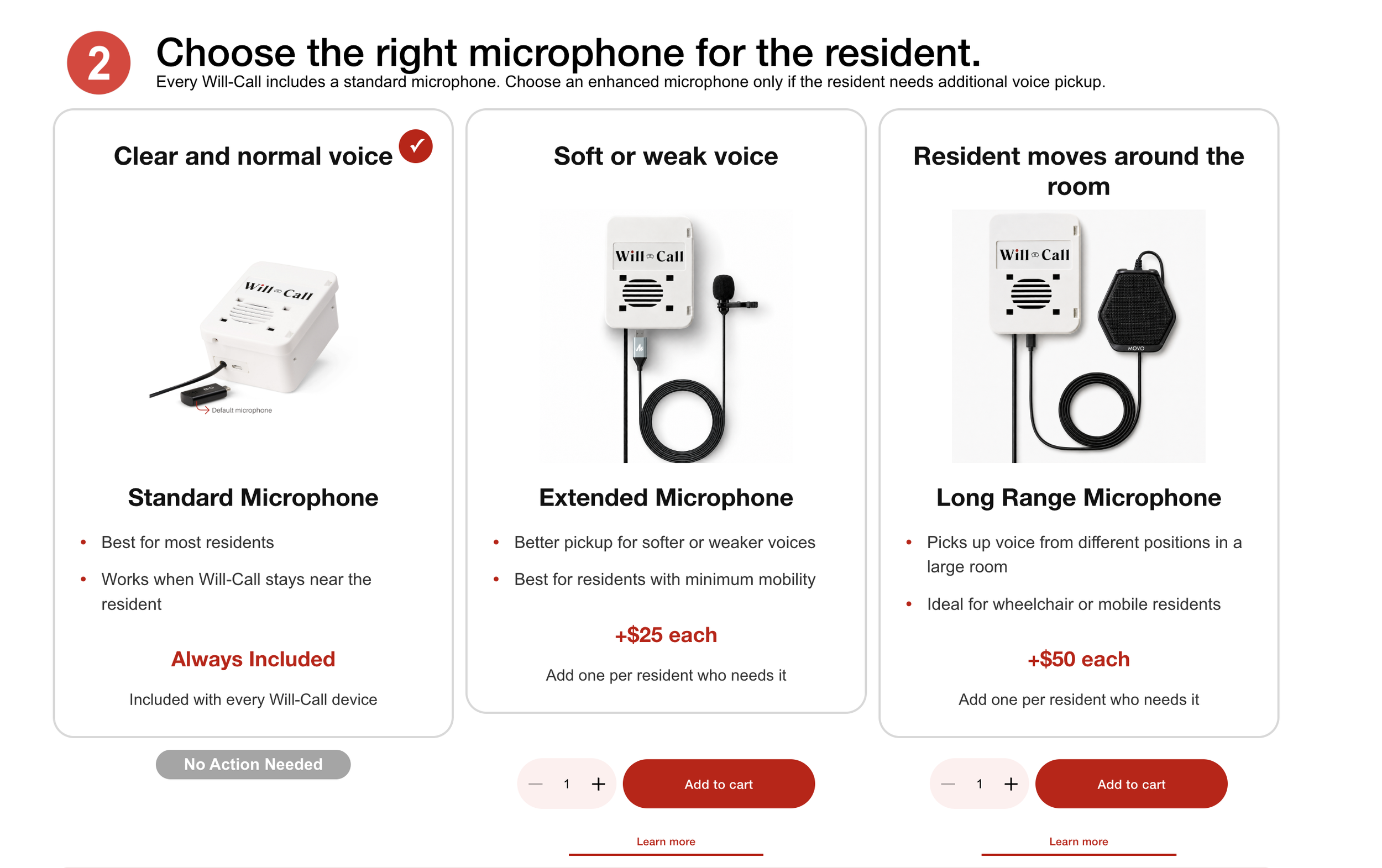
How to choose a Microphone for Will-Call
Voice is the first thing that determines which microphone belongs with each resident. Three profiles cover most of what you will see on the floor.
Resident A: A clear voice, most of the day in bed
The Standard Microphone that comes with every Will-Call is a good fit here. Place it within a few feet of her pillow and it will pick up "I need help" reliably.
You do not need to add anything to the order for this resident. The Standard Microphone is included.
Resident B: A soft voice from advanced MS, ALS, or general weakness
A soft voice is the situation the Extended Microphone is designed for. It lets the microphone sit closer to the resident's mouth, often clipped near the bedside, so a quiet "I need help" is picked up cleanly.
If the resident's voice has changed over the last few months, or if staff have noticed it is harder to hear her from across the room, add the Extended Microphone to her Will-Call.
> "Her voice is really soft. The staff said sometimes they don't even hear her until they walk into the room."> — Family member describing a resident with advanced MS, from a Will-Call setup conversation
The rule: match the microphone to the voice and to the noise around the resident.
Where Does Each Resident Spend Their Time?
Voice is the first factor. Mobility is the second. If a resident moves around the room during the day, the microphone needs to hear her from more than one spot.
A bed-bound resident
The microphone does not need to travel. A Standard or Extended Microphone placed near the bed covers everywhere she spends her day.
No additional choice needed beyond what you decided in the voice section.
A resident who uses a wheelchair and moves around the room
She might be near the bed in the morning, at the window mid-day, and at the door before dinner. A microphone fixed near the bed will not hear her from the window.
The Long Range Microphone is designed for this situation. It has a wider pickup area so the device can hear her from more than one spot in the room.
A resident who spends the day in a recliner across the room from the panel
The nurse-call panel is on one wall. The recliner is on the other. If the microphone stays near the panel, it may not hear him clearly from the recliner.
The Long Range Microphone helps here as well, so the device can hear him without staff repositioning the microphone every time he moves.
The rule: match the microphone to how far the resident is from the device during the day, not just where he is when the microphone was first placed.
What Does the Nurse-Call Panel Look Like?
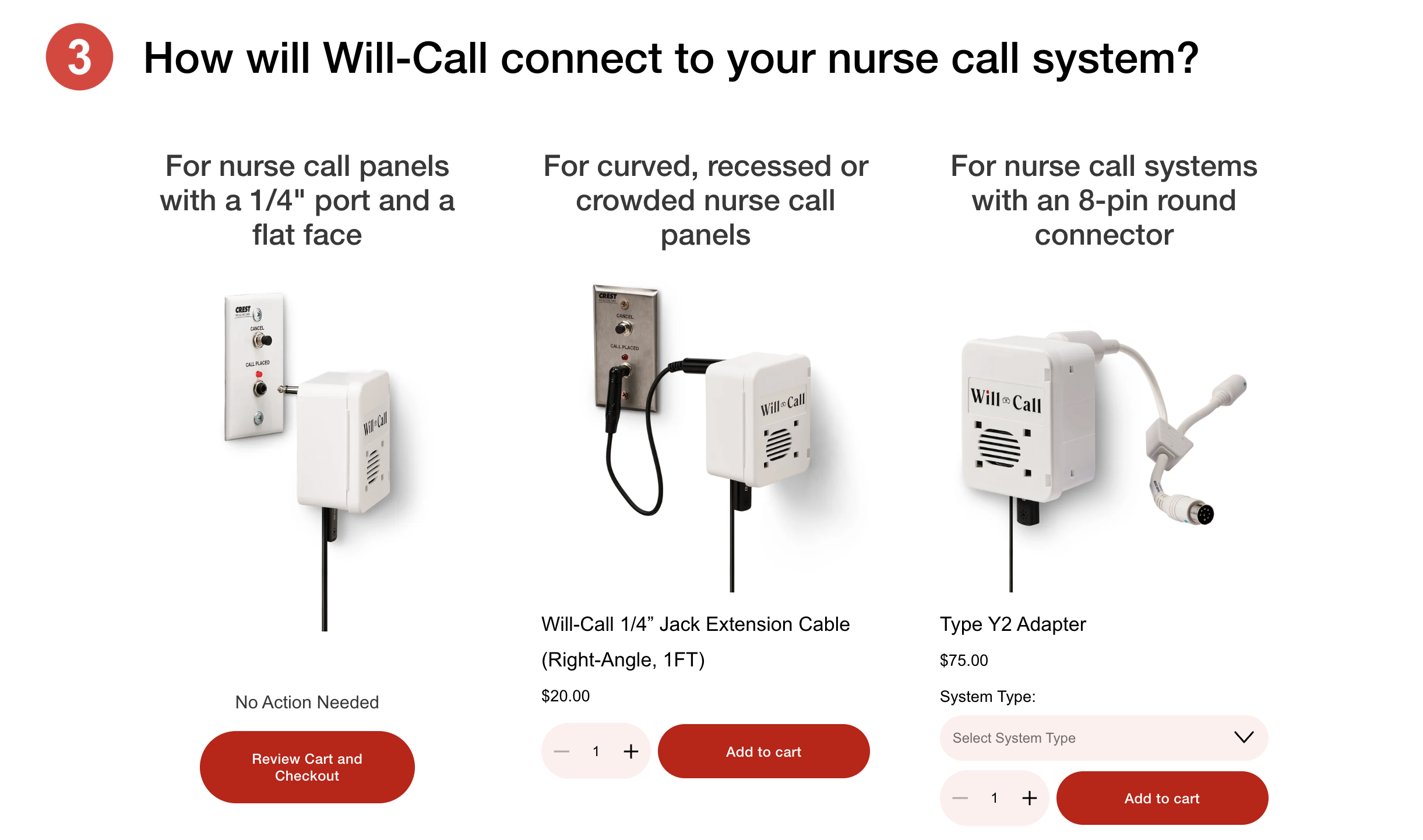
How to choose a Connector for Will-Call
Now walk into each resident's room and look at the panel. The panel decides which nurse-call connection you select at checkout.
A flat panel with an easy-to-reach 1/4-inch port
This is the simplest case. The Will-Call plugs in directly. No extension cable needed. At checkout, select the standard 1/4-inch connection.
A curved or recessed panel, or a crowded panel with multiple accessories plugged-in
The 1/4-inch port is there, but the device would jam against the wall, or you cannot get to the port without moving the bed. Add the 1-foot right-angle extension cable to the order. It lets the Will-Call sit at a comfortable angle instead of pressing against the panel.
If the panel is behind the bed and staff can barely reach it now, note that. The extension gives you room to work.
A panel with a different connection type
Some facilities have older nurse-call panels that do not use a 1/4-inch port. Look at the panel and match it to the options in the nurse-call system dropdown at checkout.
If you are not sure what type of panel you have, take a photo of it and send it to Will-Call before ordering. For a deeper technical explanation of connector types and how Will-Call connects to different systems, see how Will-Call plugs into an existing nurse call system.
Will-Call is designed to work with compatible nurse call systems. If your panel is unusual, a quick photo and a short conversation is faster than reordering.
The rule: match the connection to what the panel actually looks like, not what it is supposed to look like.
Putting It Together Before You Order
Go back to the resident list you wrote down at the start. For each resident, fill in the two remaining columns:
- Which microphone fits this resident (Standard, Extended, or Long Range)
- Which nurse-call connection this room needs (direct, right-angle extension, or a specific system type from the dropdown)
Here is what a short list might look like:
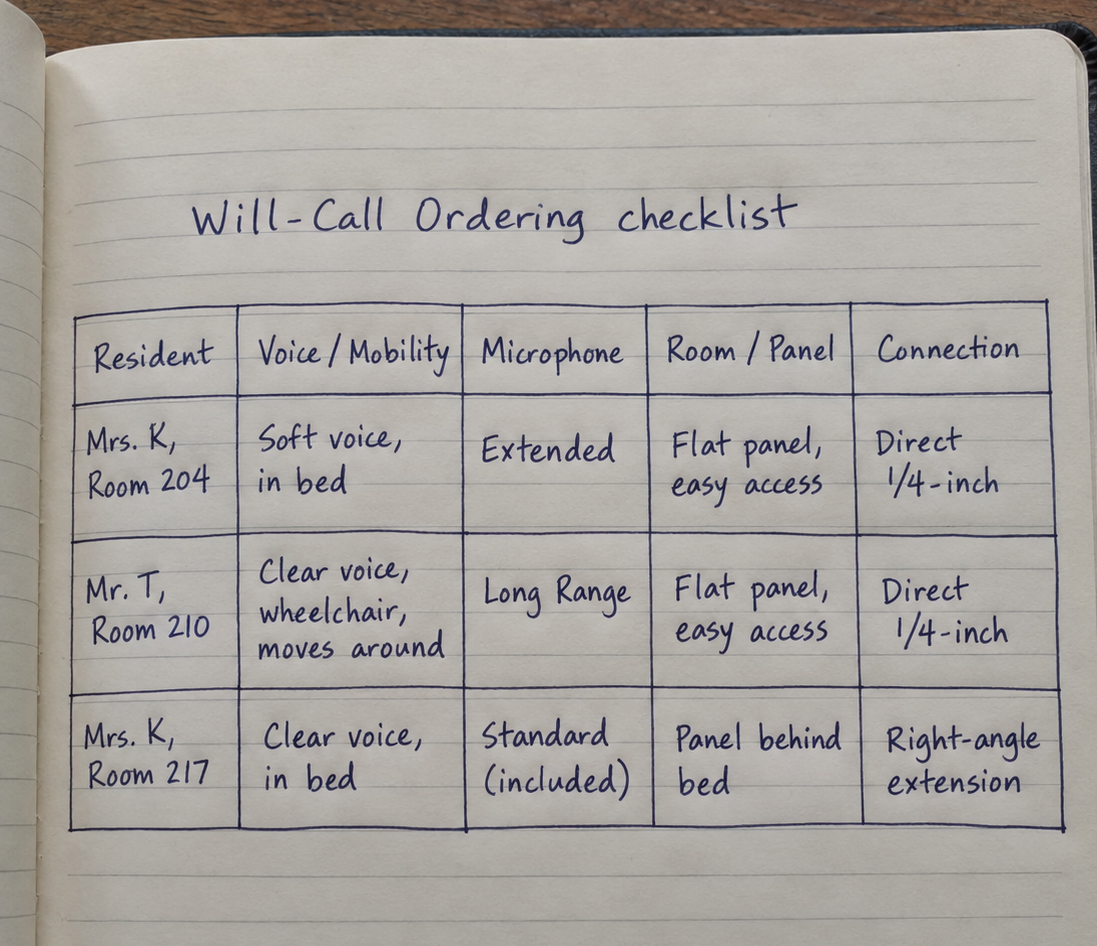
Handwritten Will-Call ordering checklist showing three residents, their voice and mobility needs, recommended microphone, room or nurse-call panel setup, and connection type.
That list is your order. Three devices. Two need enhanced microphones added. One needs a right-angle extension. All three use the standard 1/4-inch connection.
You can mix and match microphones on one order. Each device is set up for the resident it is going to.
When you reach the checkout page, the choices are already made.
If any resident or any room feels uncertain, contact Will-Call before you order. A short conversation, or a photo of the panel, is faster than reordering.
If you would like to try Will-Call with one resident before ordering for a broader group, the Will-Call Test Drive is available for a 30-day evaluation in the actual room.
FAQ
Can I mix and match microphones on one order?
Yes. Each Will-Call is set up for one resident, so you can add an Extended Microphone to one device, a Long Range Microphone to another, and leave a third with the Standard Microphone that is already included. Just make sure you know which microphone belongs with which resident.
What if I am not sure which nurse-call connection to select?
Take a photo of the panel in the resident's room and send it to Will-Call before ordering. The team can look at the panel and confirm which option in the dropdown matches your system, so you order the right connection the first time.